
The fastest way to run each local model on my Mac
I ran four local models through Ollama, MTPLX and oMLX on my 64 GB Mac Studio. Inkling 2 Mini runs 2.2 times faster on MTPLX and scored highest. Gemma 4 and Qwen3.8 are already fastest on Ollama.
In August I wrote that you don’t need a Mac that can run local AI models. In September I tested what my 64 GB Mac Studio runs locally and settled on Ollama, because it was enough.
Then Thinking Machines released Inkling 2 Mini, and people posted much higher speeds for it than I got from Ollama. They were using other runtimes. So I asked a narrower question: for each model I use, which runtime runs it fastest, and does the faster runtime change the answers?
tl;dr. The runtime can matter as much as the model. Inkling 2 Mini runs 2.2 times faster on MTPLX than on Ollama and scored 39 of 39 on my tasks. Qwen3.5 9B gets 1.4 times faster. Gemma 4 26B and Qwen3.8 27B are already fastest on Ollama.
What I tested
Four models that fit in 64 GB with room to spare:
- Inkling 2 Mini, Thinking Machines’ mixture-of-experts model with 26 billion parameters, 5 billion active per token.
- Qwen3.8 27B, the winner of my September test.
- Qwen3.5 9B, a small dense model.
- Gemma 4 26B, Google’s mixture-of-experts model with 4 billion active parameters.
Three runtimes:
- Ollama 0.40.17, a release candidate at the time. I ran it as a second server on another port, so the stable Ollama that Lokki uses kept working. Two versions side by side can trigger Ollama’s version mismatch warning.
- MTPLX 2.13, a Mac runtime whose author publishes tuned builds, called packs, for each model it supports.
- oMLX, an MLX server with its own drafting, including Google’s small drafter model for Gemma 4.
Same Mac, same prompts, one model in memory at a time, temperature 1.0. Speed is the median of three runs per prompt. Quality comes from seven tasks taken from my assistant work in Lokki: an agent loop with calendar and mail tools, questions about a long document, a failing test, a German invoice turned into JSON, a table screenshot, facts spread across notes and a formal German email. That makes 39 points.
Measured on my Mac Studio M5 Max, 64 GB
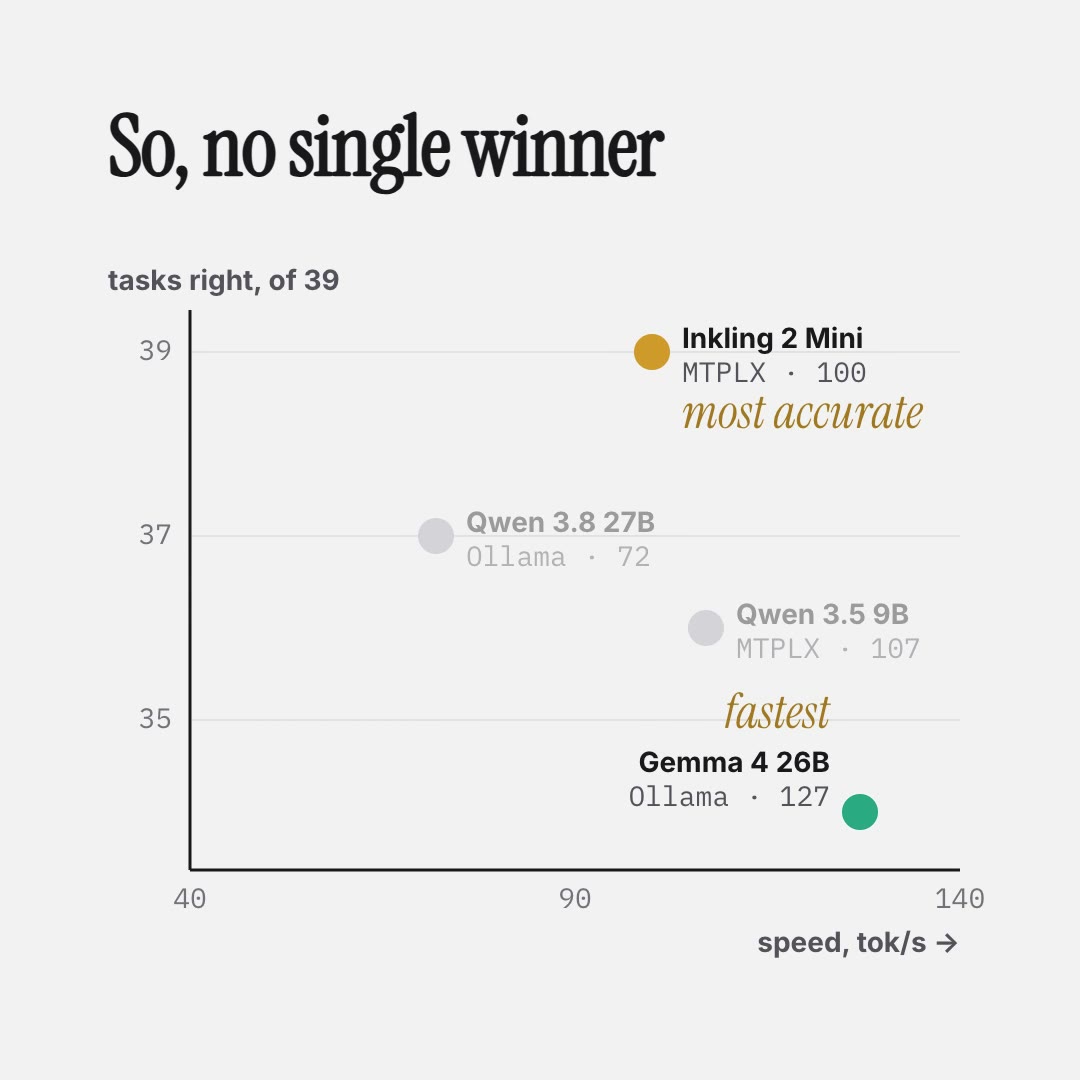
Each model on its fastest runtime, and the runner-up
Average output speed across three prompts against points on seven assistant tasks. Colour names the runtime. Hover or tap a point for the build and per-prompt speeds.
- MTPLX
- Ollama
- oMLX
- Fastest setup
- Runner-up
Filled dots are each model’s fastest setup, rings the runner-up. No model takes the top right corner. Inkling scored highest, Gemma ran fastest.
Where the speed comes from
Each of these runtimes can draft several tokens ahead and check them in one pass of the full model. How much that helps depends on how well a runtime supports a given model.
Output speed
Inkling more than doubles its speed on MTPLX
Output tokens per second for each model on its two fastest runtimes. Code is the most predictable text, so drafting runtimes gain most there.
- MTPLX
- Ollama
- oMLX
MTPLX drafts with Inkling’s own prediction head and checks every drafted token with the full model, so the output follows the model’s own distribution. That took Inkling from 45 to 100 tokens per second on average. oMLX landed in between at 64.
Qwen3.8 27B goes the other way. As I found in September, Ollama’s official build already uses Qwen’s multi-token prediction, and the MTPLX pack ran about 20 percent slower here. Gemma 4 on oMLX with Google’s drafter won on code and lost on prose and long prompts. On average Ollama stays ahead, and it reads long prompts faster.
Reading a long prompt
Reading a long prompt
Time to the first token on a 16 KB file
Seconds until the answer starts, on each model's fastest runtime. Shorter is better. Each tokenizer counts the same file as 4,300 to 5,100 tokens.
- MTPLX
- Ollama
- oMLX
Inkling on MTPLX reads a 5,000-token source file in two seconds, against more than five on Ollama. Qwen3.8 27B needs four and a half seconds on either runtime. For an assistant that reads files and mail before it answers, this wait matters as much as the output speed.
Does a faster runtime change the answers
Checking every drafted token keeps the model’s output distribution. The weights are a separate question. The Inkling pack I used keeps the official 4-bit experts and stores attention in 8 bits. Its author reports that it picks the same top token as the official weights at 96.5 percent of positions.
Seven tasks, fastest setups
Points per task
| Task | Inkling 2 Mini | Qwen3.8 27B | Qwen3.5 9B | Gemma 4 26B |
|---|---|---|---|---|
| Agent loop: calendar, mail, draft, reminder | 7/7 | 7/7 | 7/7 | 7/7 |
| Questions about an 8,000-token document | 6/6 | 6/6 | 6/6 | 6/6 |
| Fix a failing test | 2/2 | 2/2 | 2/2 | 2/2 |
| German invoice to JSON, 12 fields | 12/12 | 12/12 | 12/12 | 9/12 |
| Reason over a table screenshot | 4/4 | 3/4 | 2/4 | 2/4 |
| Connect facts across 18 notes | 3/3 | 3/3 | 2/3 | 3/3 |
| Formal German email with constraints | 5/5 | 4/5 | 5/5 | 5/5 |
| Total | 39 | 37 | 36 | 34 |
Inkling got every point. Gemma lost three on the invoice by writing the date the German way, 14.11.2026, instead of the requested 2026-11-14. Treat a gap of two or three points as noise. Each task ran once at temperature 1.0, and the same Gemma build scored 36 the day before.
What caught me out
- Inkling keeps thinking with thinking turned off. At the lowest effort it still writes a hidden reasoning block before the answer, on every runtime. Leave room for it in the output budget.
- MTPLX’s strict JSON schema mode returned garbage on the invoice task. Plain JSON mode with my own validation worked.
- MTPLX answers one request at a time. Several agents calling it at once wait in line.
- Stopping
mtplx serveleft a child process holding 17 GB of memory. Stopmtplx.serveras well.
What I would pick
Inkling 2 Mini on MTPLX for work where accuracy matters, and Gemma 4 on Ollama when a quick answer matters more. Together they need under 40 GB, which still leaves room for my agents and tools.
To try MTPLX:
python3 -m pip install mtplx
mtplx serve --model Youssofal/Inkling-2-Mini-MTPLX-Optimized-Speed --port 8000It downloads the 17 GB pack on first start and serves an OpenAI-compatible API on port 8000. To turn thinking off, send enable_thinking: false. MTPLX treats reasoning_effort: "none" as low.
My advice from August stands. Buy the Mac for your work and treat local models as a useful extra. If you do run one, test more than one runtime before you settle.