
What my 64 GB Mac Studio runs locally
I tested current local models on the Mac Studio I recommended. Qwen3.8 27B runs at 75 tokens per second, and the build you download matters as much as the model.
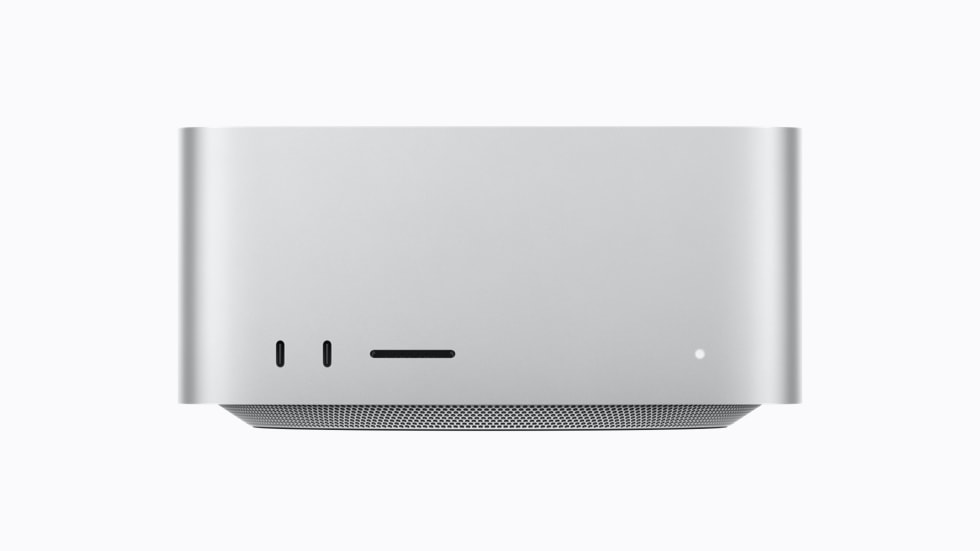
In August I argued that you should not buy a Mac for local AI models. I recommended 64 GB of memory and bought exactly that: a Mac Studio with M5 Max, a 40-core GPU, 64 GB and 1 TB.
Now it is on my desk, so I tested what it actually runs.
tl;dr. Qwen3.8 27B runs at about 75 tokens per second on the 64 GB machine, fast enough to leave thinking on. The build you download matters as much as the model. A community build of the same model ran at less than half that speed at the same size.
What fits in 64 GB
macOS lets the GPU use 51.8 GiB of this machine’s memory by default. The model has to fit inside that limit together with its context cache. The rest stays with macOS, Xcode, browsers and whatever else you run.
What fits in 64 GB
Model files against the GPU memory limit
Download size in GB. macOS lets the GPU use 51.8 GiB of this machine's memory by default, which is 55.7 GB in these units. The model also needs room for its context cache.
- Qwen3.8
- Muse Glimmer
- Qwen3.6
Every model around 30 billion parameters fits at 8-bit with room to spare. At 16-bit they reach or pass the limit. Qwen’s fast new mixture-of-experts model, Qwen3.8 Flash-Next, needs around 90 GB even at 4-bit, so it stays out of reach. The larger releases from this summer, such as GLM-5.3 Flash with 320 billion parameters, are further away still.
That matches what I expected in August: 64 GB is enough for the best model in the 30B class, and 128 GB would only add models that barely fit.
The models worth testing
Two models released in August compete for the 64 GB slot.
Qwen3.8 27B is Qwen’s current open model at this size. It reads images and video, handles 262,000 tokens of context and can think before answering. Qwen also trained it to predict several tokens at once, which speeds up generation.
Muse Glimmer 30B is Meta’s small model, distilled from Muse Spark and published under the Apache 2.0 license. Meta built it for agents on consumer hardware and ships it with a separate drafter model that proposes 16 tokens at a time.
I also tested a community build of Qwen3.8 27B with its refusals removed, because that kind of build is popular for local use.
Published scores
Qwen3.8 27B leads its size class on paper
Scores reported by Qwen for all three models. Higher is better. I did not run these benchmarks myself.
- Qwen3.8 27B
- Muse Glimmer 30B
- Qwen3.6 27B
On the published numbers, Qwen3.8 27B leads on almost every benchmark both companies report. Muse Glimmer does better on tool calling, where Meta reports 75.5 on MCP Atlas against 62.5 for Qwen3.6 27B. Qwen has not published an MCP Atlas score for Qwen3.8.
Treat these tables with care. Each company chooses its own comparisons. Qwen’s table even places Qwen3.8 27B ahead of an older Claude model on SWE-bench Pro, which I would not assume from one benchmark.
How fast it runs
I ran three prompts on each build: code, a technical explanation and a small reasoning problem. Each ran with thinking off and on, and generated 512 tokens.
Measured on my Mac Studio M5 Max, 64 GB
Official builds run about twice as fast
Output tokens per second. Predictable text such as code runs faster on builds that draft several tokens at once. The community builds run at one speed for everything.
- Official Qwen3.8 build
- Muse Glimmer with drafter
- Community uncensored build
The official 4-bit Qwen3.8 build averaged 75.6 tokens per second. Muse Glimmer with its drafter came close at 69.1. Meta reports 50.2 tokens per second for the same chip using its own runtime, so Ollama does well here.
The community build surprised me. Removing refusals does not change the size of a model, yet the 4-bit version ran at 33.9 tokens per second and the 8-bit version at 18.8. Its speed was identical for code, prose and reasoning. That is the sign of a build that generates every token one at a time. The official builds use Qwen’s multi-token prediction. Predictable text such as code gets the largest boost.
Memory bandwidth explains the rest. The M5 Max reads about 614 GB per second, and a dense model reads all of its weights for every token. For a 29.5 GB file that allows at most about 21 tokens per second. The community build reached 18.8. The official builds pass that ceiling because they accept several drafted tokens per read.
Full results
Average output speed by build
| Build | Ollama tag | Size | Thinking off | Thinking on |
|---|---|---|---|---|
| Qwen3.8 27B, 4-bit MLX | qwen3.8:27b-mlx | 18 GB | 78.5 tok/s | 72.7 tok/s |
| Muse Glimmer 30B, 4-bit with drafter | muse-glimmer:30b-nvfp4-dflash | 19 GB | 71.3 tok/s | 66.8 tok/s |
| Qwen3.8 27B, 8-bit GGUF with MTP | qwen3.8:27b-mtp-q8_0 | 30 GB | 45.7 tok/s | 45.7 tok/s |
| Qwen3.8 27B, 8-bit MLX | qwen3.8:27b-mxfp8 | 32 GB | 39.4 tok/s | 38.0 tok/s |
| Uncensored Qwen3.8 27B, 4-bit MLX | orcarouter/Qwen3.8-27B-Uncensored:mlx-4bit | 16 GB | 33.9 tok/s | 33.9 tok/s |
| Uncensored Qwen3.8 27B, 8-bit MLX | orcarouter/Qwen3.8-27B-Uncensored:mlx-8bit | 29 GB | 18.8 tok/s | 18.8 tok/s |
Thinking cost a few tokens per second at most. It makes answers arrive later because the model writes its reasoning first, so the speed you start from matters. At 75 tokens per second, a thousand tokens of thinking take about 13 seconds.
Where to keep the files
The 8-bit community build, 29.5 GB, loaded in 9.3 seconds from the internal SSD. My Samsung T7 Shield connects at 10 Gb/s, about 1 GB per second at best, so the same file needs at least half a minute. Ollama unloads idle models after five minutes and loads them again on the next request.
Keep the models you use on the internal drive. An external drive works well for the ones you are keeping for later. In August I recommended Thunderbolt 5 storage for models, and this is why a fast enclosure is worth more than a 10 Gb/s USB drive for models you load often.
How I run it
Ollama is enough. On Apple silicon it runs MLX builds, and the official library already carries the builds I tested.
ollama pull qwen3.8:27b-mlx
ollama run qwen3.8:27b-mlxUse /set nothink inside the chat to answer without thinking, or pass "think": false through the API. If you want the 8-bit weights at a usable speed, qwen3.8:27b-mtp-q8_0 averaged 45.7 tokens per second.
What changed since August
A 64 GB Mac now runs a strong model fast enough to use every day, privately and offline. That is more than I expected in August.
The rest holds. It is one model, it takes a large share of the memory my agents and tools need, and the hard work still goes to frontier models in the cloud. Buy the 64 GB machine for your work, and treat the local model as a useful extra that comes with it.